
The Figshare Search Interface
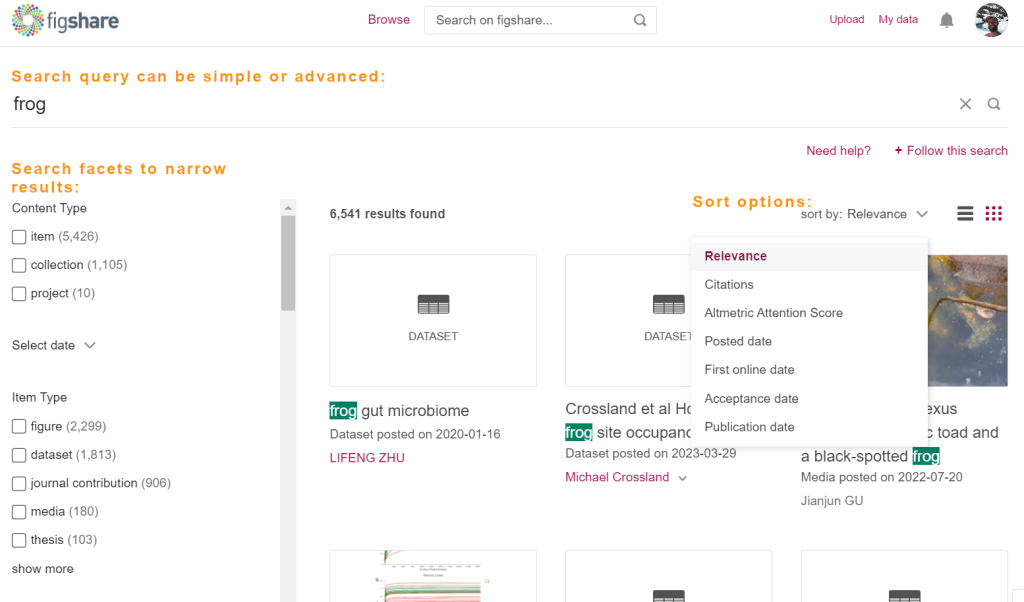
To search across all of Figshare, go to figshare.com/search. Enter the search terms in the area just above the results are. To filter, select the parameters on the left and select ‘Apply filters’ to apply.
Data can be ordered with the default as ‘Relevance’. This default order allows users to see the most relevant items first and can be filtered to show ‘Citations’, ‘Altmetric Attention Score’, ‘Posted date’, ‘First online date,’ ‘Acceptance date’, and ‘Publication date’.
Users can switch between list or tiled view of results by clicking on the list or tile icon in the top right.
Reusing content
Content on Figshare is available for reuse to varying degrees depending on the attributed reuse license.
By clicking the license itself on the right-hand side of an item page, you can learn more about the different license types and rights for use, reuse, attribution, etc.

